
Cordis 内核
Cordis 内核管理 plugins 的安装、卸载与依赖。Agent 能力住在这些 plugins 里。
DeepSeek Harness developer preview · 0.1.2-rc.1
每项能力都是可替换、可重组的 plugin:models、tools、skills、sessions、sandboxes、storage、loops、scheduling 和 UI。
用下面命令在 127.0.0.1:3080 启动本地 Web UI npx @deepseek-ai/dsh web。MIT 许可。Node.js ^22.19.0 或 >=24。0.1.2-rc.1 的 CLI 解压后 43 KB。
$ npx @deepseek-ai/dsh web
Agent + 模型 = Harness
HARNESS
模型是 agent 的灵魂。
DeepSeek Harness 让 agent 理解其所在环境、使用 tools,并在真实场景中持续工作。
Cordis 内核管理 plugins 的安装、卸载与依赖。Agent 能力住在这些 plugins 里。
Plugins 提供每项 agent 能力,包括 models、tools、skills、sessions、sandboxes、storage、loops、scheduling 和 UI。Cordis 的 services 与 events 让 plugins 协同工作。
开发者无需改动 DeepSeek Harness 源码,即可在配置层选择、替换或扩展任一能力。
设计方式
DeepSeek Harness 建立在 Cordis 上。Plugins 提供 models、tools、skills、sessions、sandboxes、storage、loops、scheduling 和 UI。开发者在配置里选择或扩展能力,而不是 fork 源码树。官方 Settings 画面列出 159 条已安装行。
模型看到的一切都记入只追加的会话日志:system prompts、推理、tool calls 与结果、子 agent 调度,以及每一次上下文注入。Resume、fork、search 和 replay 共用同一事件流。
Trajectory 视图细节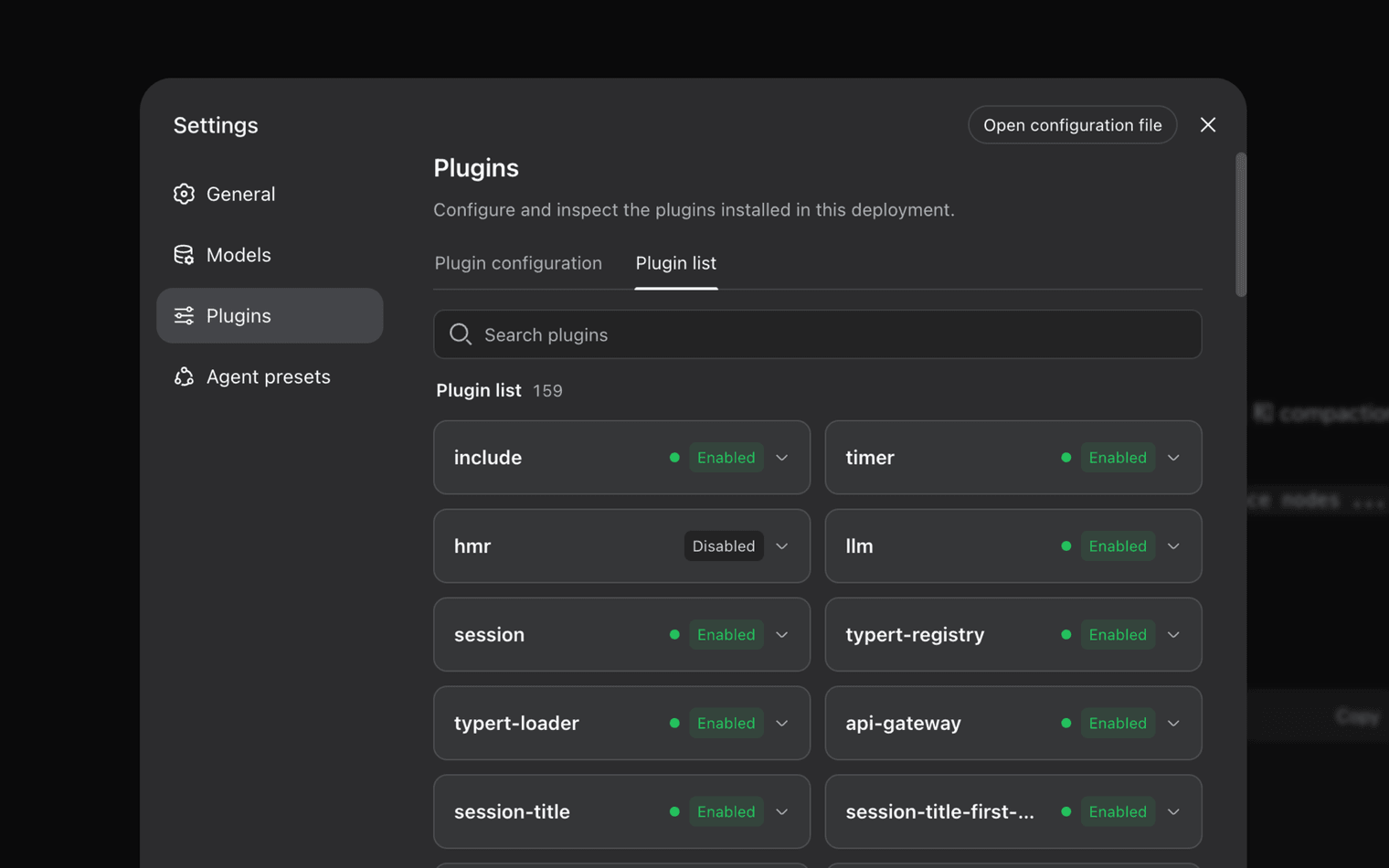
模型看到的一切都会写入仅追加的会话日志,包括系统提示词、推理、tool calls 与结果、子 agent 调度,以及每一次上下文注入。在 Trajectory 视图中,你可以按来源查看这些记录。Resume、fork、search 和 replay 共用同一事件流。
Standard mode 提供完整工具组合。Code / PTC mode 通过模型生成的代码编排多轮 tool calls。Minimal mode 只保留 shell 与文件编辑,用于薄环境评测。Creator mode 可以检查当前 runtime、在内存中试验 Cordis plugins,并组合成新模式。
开始使用
安装 Node.js ^22.19.0 或 >=24.0.0,然后用 npx 启动本机 Web UI。
$ npx @deepseek-ai/dsh web
克隆已发布的源码,并按仓库中的安装命令操作。此处只显示文本,不是外链。
$ git clone https://github.com/deepseek-ai/deepseek-harness
按公开事实做的品类对比。DeepSeek Harness 仍是带破坏性变更的 developer preview。
| 标准 | DeepSeek Harness | Claude Code | Codex | OpenCode |
|---|---|---|---|---|
| 分发 | npm CLI + 源码。 npx @deepseek-ai/dsh web | 厂商 CLI / IDE 界面 | 厂商 CLI / IDE 界面 | 社区开源 agent |
| 许可证 | 0.1.x 为 MIT | 专有产品条款 | 专有产品条款 | 开源项目许可 |
| Plugin 模型 | Cordis plugins for models, tools, skills, session, sandbox, UI | 带扩展钩子的封闭产品 | 带扩展钩子的封闭产品 | Community plugins, not Cordis |
| 会话轨迹 | 只追加日志 + Trajectory resume / fork / replay | 厂商会话 UI | 厂商会话 UI | 随构建而变 |
| 运行模式 | Standard, Code / PTC, Minimal, Creator | 单一产品模式 | 单一产品模式 | 可配置,不是这四个固定名称 |
| Production claim | Developer preview。未经安全审计。 | 正式可用产品 | 正式可用产品 | 社区支持 |
MIT-licensed repository and npm package @deepseek-ai/dsh. npm signatures and shasums are published per version. Commands on this site are shown as text, not outbound links.
The README states there will be compatibility-breaking changes. GitHub Issues are closed; reports go to Discussions. Do not treat sandbox prompts as a containment guarantee. Read the 合法使用政策.
0.1.2-rc.1 shasum fef213043313affc36ca2226d2637ad483b5e3f6. 0.1.1-rc.2 shasum 1a5112369f1c46b13a6e6f21de8af5e6afd45074. Full notes on the 下载完整性 section.
现场笔记
来自真实安装后的讨论,不是营销引言。
Swapped the model plugin without touching the DeepSeek Harness tree. Cordis composition is the reason I stayed.
Discussion note · runtime author
Trajectory showed the exact bash payload that listed my workspace. Resume from that event worked. The UI still hiccups on very long streamed turns.
Discussion note · eval engineer
On Windows 11, C:\Windows\Temp plus windows-acl made every sandboxed pwsh call die with SandboxUnavailableError. Moving TEMP off the system temp dir fixed it.
Discussion note · Windows 11 Pro 25H2
npx brought the Web UI up in one command. Port 3080 was already reserved by Hyper-V, so I had to pick another port. That is in the port 3080 guide.
Discussion note · desktop lab
Creator mode is the only place I could inspect plugins in memory before writing a Profile. Token use on a multi-hour coding loop was higher than I budgeted.
Discussion note · preset builder
I pinned 0.1.1-rc.2 after an unpinned npx pull changed behavior overnight. The README warning is not decorative.
Discussion note · platform ops
Swapped the model plugin without touching the DeepSeek Harness tree. Cordis composition is the reason I stayed.
Discussion note · runtime author
Trajectory showed the exact bash payload that listed my workspace. Resume from that event worked. The UI still hiccups on very long streamed turns.
Discussion note · eval engineer
On Windows 11, C:\Windows\Temp plus windows-acl made every sandboxed pwsh call die with SandboxUnavailableError. Moving TEMP off the system temp dir fixed it.
Discussion note · Windows 11 Pro 25H2
npx brought the Web UI up in one command. Port 3080 was already reserved by Hyper-V, so I had to pick another port. That is in the port 3080 guide.
Discussion note · desktop lab
Creator mode is the only place I could inspect plugins in memory before writing a Profile. Token use on a multi-hour coding loop was higher than I budgeted.
Discussion note · preset builder
I pinned 0.1.1-rc.2 after an unpinned npx pull changed behavior overnight. The README warning is not decorative.
Discussion note · platform ops
Yes. DeepSeek Harness is published under the MIT License as a developer preview. You can inspect, modify, and self-host it. Early 0.0.1-rc packages used BSD-3-Clause; current 0.1.x packages are MIT.
Yes, if Node.js is ^22.19.0 or >=24.0.0. The Windows sandbox uses an ACL restricted-token backend. Known issues include C:\Windows\Temp ACL lockouts, workspaces owned by BUILTIN\Administrators, and port 3080 reserved by Hyper-V, WSL2, or Docker.
No. DeepSeek Harness is the agent runtime around models. It supplies plugins for tools, sessions, sandboxes, storage, loops, scheduling, and the Web UI. Model IDs and API prices are separate releases.
dsh is an npm CLI, not a Windows installer. Heuristic scanners sometimes flag Node processes that spawn shells. Check the published shasum for the version you pinned, such as fef213043313affc36ca2226d2637ad483b5e3f6 for 0.1.2-rc.1.