
Ядро Cordis
Ядро Cordis управляет plugins: установка, удаление и зависимости. Возможности агента живут в этих plugins.
DeepSeek Harness developer preview · 0.1.2-rc.1
Каждая возможность — plugin, который можно заменить или собрать заново: models, tools, skills, sessions, sandboxes, storage, loops, scheduling и UI.
Поднимите локальный Web UI на 127.0.0.1:3080 командой npx @deepseek-ai/dsh web. Лицензия MIT. Node.js ^22.19.0 или >=24. Распакованный CLI 43 КБ на 0.1.2-rc.1.
$ npx @deepseek-ai/dsh web
Agent + model = Harness
HARNESS
Модель это душа агента.
DeepSeek Harness даёт агенту понять среду, вызывать tools и продолжать работу в реальных условиях.
Ядро Cordis управляет plugins: установка, удаление и зависимости. Возможности агента живут в этих plugins.
Plugins дают каждую возможность агента: models, tools, skills, sessions, sandboxes, storage, loops, scheduling и UI. Services и events Cordis связывают их вместе.
Разработчик выбирает, меняет или расширяет возможность в конфигурации, не меняя исходники DeepSeek Harness.
Подход к дизайну
DeepSeek Harness построен на Cordis. Plugins дают models, tools, skills, sessions, sandboxes, storage, loops, scheduling и UI. Разработчики выбирают или расширяют возможность в конфигурации, а не форкают дерево. Официальный кадр Settings показывает 159 установленных строк.
Всё, что видит модель, пишется в append-only журнал сессии: system prompts, рассуждения, tool calls и результаты, планирование субагентов и каждая инъекция контекста. Resume, fork, search и replay идут по одному потоку событий.
Подробности Trajectory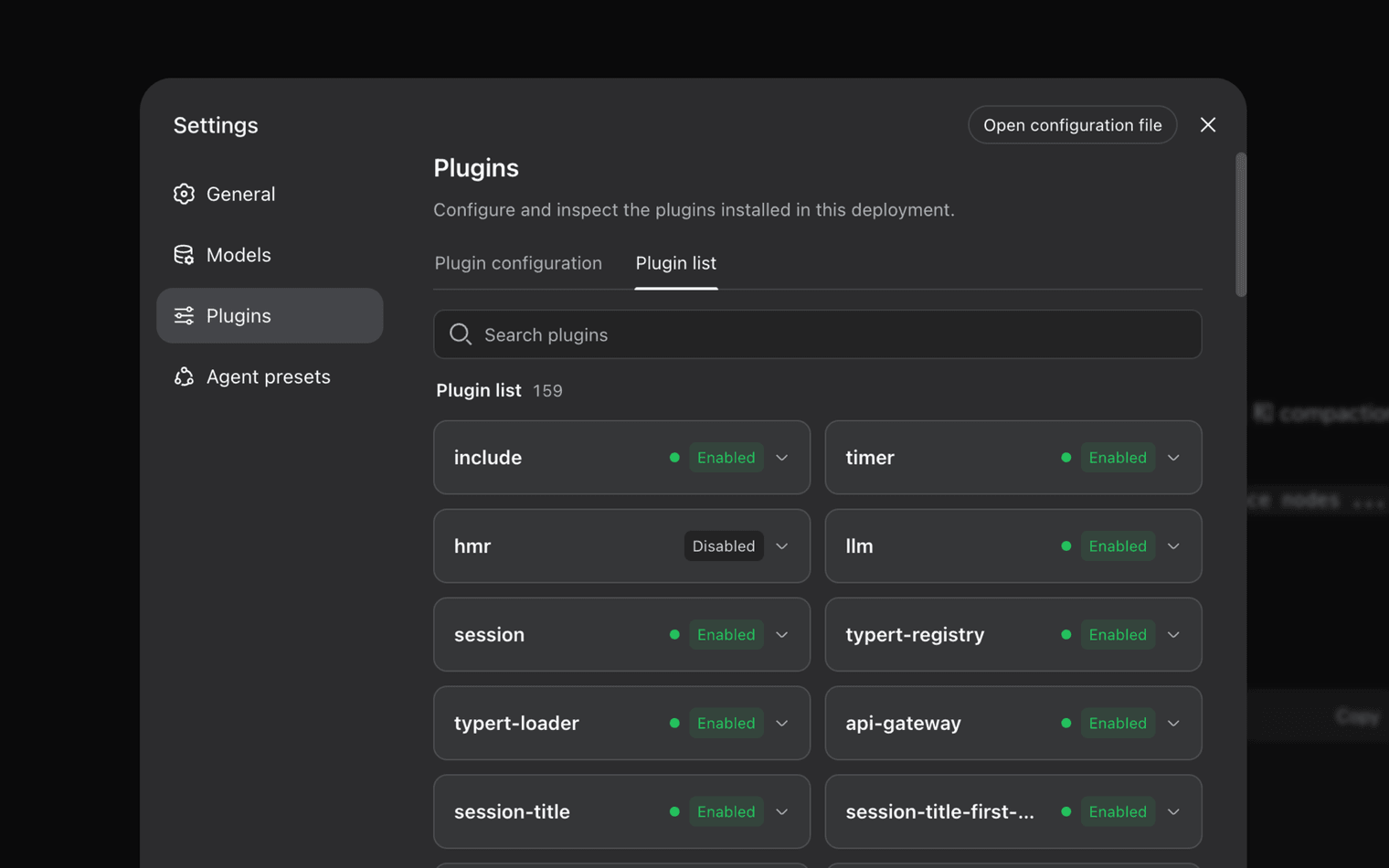
Всё, что видит модель, пишется в append-only журнал сессии: system prompts, рассуждения, tool calls и результаты, планирование субагентов и каждая инъекция контекста. В Trajectory эти записи смотрят по источнику. Resume, fork, search и replay идут по одному потоку событий.
Standard mode даёт полный набор tools. Code / PTC mode оркеструет несколько раундов tool calls кодом модели. Minimal mode оставляет shell и редактор файла для тонких бенчмарков. Creator mode смотрит текущий runtime, испытывает Cordis plugins в памяти и собирает новые режимы.
Начать
Поставьте Node.js ^22.19.0 или >=24.0.0, затем поднимите локальный Web UI через npx.
$ npx @deepseek-ai/dsh web
Клонируйте опубликованный исходник и следуйте командам в репозитории. Здесь только текст, не внешняя ссылка.
$ git clone https://github.com/deepseek-ai/deepseek-harness
Сравнение публичных фактов по этой категории. DeepSeek Harness — developer preview с несовместимыми изменениями.
| Критерий | DeepSeek Harness | Claude Code | Codex | OpenCode |
|---|---|---|---|---|
| Дистрибуция | npm CLI + исходники. npx @deepseek-ai/dsh web | Поверхность vendor CLI / IDE | Поверхность vendor CLI / IDE | Сообщественный open-source агент |
| Лицензия | MIT на 0.1.x | Проприетарные условия продукта | Проприетарные условия продукта | Лицензия open-source проекта |
| Модель plugins | Cordis plugins for models, tools, skills, session, sandbox, UI | Закрытый продукт с хуками расширений | Закрытый продукт с хуками расширений | Community plugins, not Cordis |
| Трасса сессии | Append-only журнал + Trajectory resume / fork / replay | Vendor UI сессии | Vendor UI сессии | Зависит от сборки |
| Режимы выполнения | Standard, Code / PTC, Minimal, Creator | Один продуктовый режим | Один продуктовый режим | Настраивается, не эти четыре имени |
| Production claim | Developer preview. Безопасность не аудировалась. | Общедоступный продукт | Общедоступный продукт | Поддержка сообщества |
MIT-licensed repository and npm package @deepseek-ai/dsh. npm signatures and shasums are published per version. Commands on this site are shown as text, not outbound links.
The README states there will be compatibility-breaking changes. GitHub Issues are closed; reports go to Discussions. Do not treat sandbox prompts as a containment guarantee. Read the политика законного использования.
0.1.2-rc.1 shasum fef213043313affc36ca2226d2637ad483b5e3f6. 0.1.1-rc.2 shasum 1a5112369f1c46b13a6e6f21de8af5e6afd45074. Full notes on the целостность загрузки section.
Полевые заметки
Из обсуждений после реальных установок. Это не рекламные цитаты.
Swapped the model plugin without touching the DeepSeek Harness tree. Cordis composition is the reason I stayed.
Discussion note · runtime author
Trajectory showed the exact bash payload that listed my workspace. Resume from that event worked. The UI still hiccups on very long streamed turns.
Discussion note · eval engineer
On Windows 11, C:\Windows\Temp plus windows-acl made every sandboxed pwsh call die with SandboxUnavailableError. Moving TEMP off the system temp dir fixed it.
Discussion note · Windows 11 Pro 25H2
npx brought the Web UI up in one command. Port 3080 was already reserved by Hyper-V, so I had to pick another port. That is in the port 3080 guide.
Discussion note · desktop lab
Creator mode is the only place I could inspect plugins in memory before writing a Profile. Token use on a multi-hour coding loop was higher than I budgeted.
Discussion note · preset builder
I pinned 0.1.1-rc.2 after an unpinned npx pull changed behavior overnight. The README warning is not decorative.
Discussion note · platform ops
Swapped the model plugin without touching the DeepSeek Harness tree. Cordis composition is the reason I stayed.
Discussion note · runtime author
Trajectory showed the exact bash payload that listed my workspace. Resume from that event worked. The UI still hiccups on very long streamed turns.
Discussion note · eval engineer
On Windows 11, C:\Windows\Temp plus windows-acl made every sandboxed pwsh call die with SandboxUnavailableError. Moving TEMP off the system temp dir fixed it.
Discussion note · Windows 11 Pro 25H2
npx brought the Web UI up in one command. Port 3080 was already reserved by Hyper-V, so I had to pick another port. That is in the port 3080 guide.
Discussion note · desktop lab
Creator mode is the only place I could inspect plugins in memory before writing a Profile. Token use on a multi-hour coding loop was higher than I budgeted.
Discussion note · preset builder
I pinned 0.1.1-rc.2 after an unpinned npx pull changed behavior overnight. The README warning is not decorative.
Discussion note · platform ops
Yes. DeepSeek Harness is published under the MIT License as a developer preview. You can inspect, modify, and self-host it. Early 0.0.1-rc packages used BSD-3-Clause; current 0.1.x packages are MIT.
Yes, if Node.js is ^22.19.0 or >=24.0.0. The Windows sandbox uses an ACL restricted-token backend. Known issues include C:\Windows\Temp ACL lockouts, workspaces owned by BUILTIN\Administrators, and port 3080 reserved by Hyper-V, WSL2, or Docker.
No. DeepSeek Harness is the agent runtime around models. It supplies plugins for tools, sessions, sandboxes, storage, loops, scheduling, and the Web UI. Model IDs and API prices are separate releases.
dsh is an npm CLI, not a Windows installer. Heuristic scanners sometimes flag Node processes that spawn shells. Check the published shasum for the version you pinned, such as fef213043313affc36ca2226d2637ad483b5e3f6 for 0.1.2-rc.1.
Получить превью
Windows 10/11, macOS и Linux через Node.js. Кнопки на странице загрузки готовы к вашим URL пакетов.
Скачать для Windows