
Карта возможностей
Возможности DeepSeek Harness
То, что входит в developer preview: композиция plugins, Trajectory, четыре режима выполнения и sandbox файловых эффектов. Скачивайте DeepSeek Harness, если нужен локальный Web UI, а не ещё одна карточка модели.
Cordis
Everything is a plugin
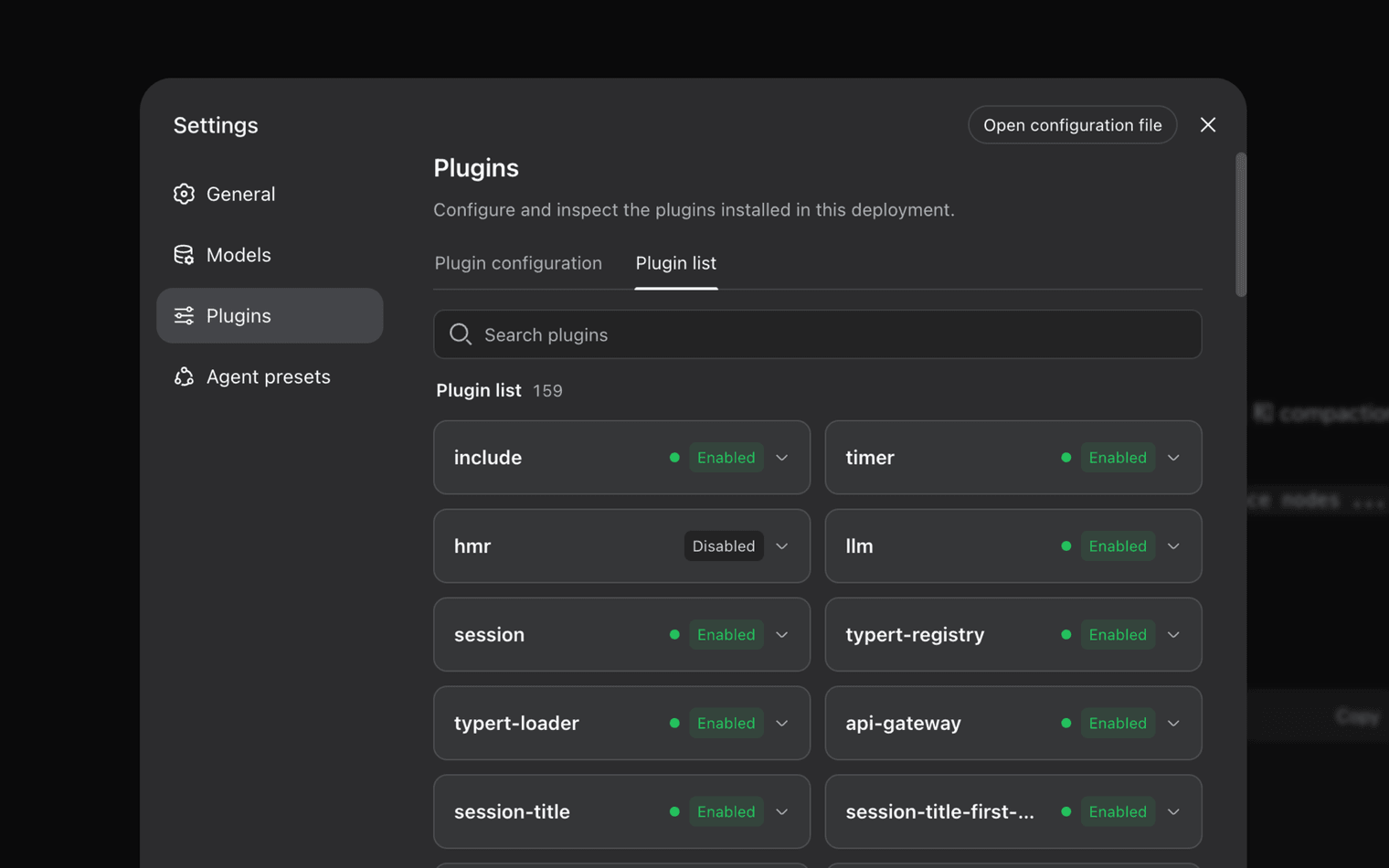
DeepSeek Harness is built on Cordis. Plugins provide models, tools, skills, sessions, sandboxes, storage, loops, scheduling, and the UI. Services and events let those plugins work together.
You select, swap, or extend a capability in configuration without changing the DeepSeek Harness source. The Web UI lists installed rows (the official screenshot shows 159) with Enabled or Disabled state and an Open configuration file action.
Composition language in the docs: Plugin, Bundle, Profile, and Patch. A missing tool is often load order, an unavailable Service, or a policy denial. Walk that order in the plugin load guide before editing code.
Журнал сессии
Каждый запуск трассируется
Everything the model sees is recorded in an append-only session log: system prompts, reasoning, tool calls and results, subagent scheduling, and every context injection.
Trajectory inspects those records by source. Resume, fork, search, and replay operate on the same stream. 0.1.2-rc.1 also shows images from users, assistants, and tool results in Trajectory, plus token usage and elapsed time at the end of each answer.
The home page shows the official Trajectory frame (Chat / Trajectory tabs, tool payload, DeepSeek V4 Pro). This page does not repeat that image.
Presets
Несколько режимов выполнения
| Режим | Что входит | Когда использовать |
|---|---|---|
| Standard | File editing, shell, file and web search, skills, planning, goals, subagents, workflows | Full coding agent on a real repo |
| Code / PTC | Standard tools exposed through the Code Mode SDK so the model can combine multi-step work in one TypeScript program. 0.1.2-rc.1 renamed Code Mode to PTC; old records stay readable. | Orchestrated multi-tool turns |
| Minimal | Two-tool agent: persistent bash and str_replace_editor | Model benchmarks in a thin environment |
| Creator | Standard capabilities plus runtime inspection, in-memory plugin experiments, and preset-authoring guidance | Building a custom agent preset |
Политика
Режимы sandbox
| SandboxMode | Файловые эффекты | Outside this knob |
|---|---|---|
| read-only | Default fail-safe. Writes denied. | Network, process visibility, credentials |
| workspace-write | Writes under the session workspace root and backend temp | Network, process visibility, credentials |
| danger-full-access | Confinement bypassed | Заявлений об изоляции нет |
Backends: Linux bwrap or Landlock, macOS Seatbelt, Windows ACL restricted-token. If no backend is usable, dsh throws SANDBOX_UNAVAILABLE instead of running bare. Windows ACL failures are documented in the Исправление ACL песочницы Windows.
0.1.2-rc.1
Interface work that landed on 3 September 2026
- Token usage and elapsed time after each answer, with expandable exact stats
- Full-history turn navigation, including jumps to unloaded turns
- Experimental Inspector and Web Preview
- ACP session controls, model settings, MCP, permissions, cancellation
- Python SDK runtime for Windows x64
- Optional SQLite session backend removed; export from an older build if you still need it